
Anyone with Google Calendar for Cold Reads can embed it into a post on this blog. Simply add a post and follow these instructions.
Embedding a Google Calendar
- In your Google Calendar, click on the little arrow next to your Cold Reads calendar’s name and select the Calendar settings link.
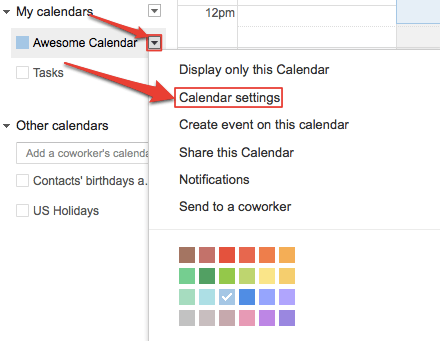
- Click the Share this Calendar tab and make your calendar public by checking the checkboxes next to Share this calendar with others & Make this calendar public. Don’t forget to press the Save button when you are done.

- Click on the Calendar Details tab and copy/paste the embed code into the form below. We’ll use it to include your schedule on our Calendar of Events. The embed code contains your Google account name, so be sure you’re okay with making that name public.

Fill out the following form, and paste the code in the designated box.


 Cold Reads/International